Introduction
A search for AI tools for content creation returns hundreds of listicles that arrange applications alphabetically. These lists show the software that exists today, but they rarely explain how a single asset moves from script to published video. The current technology landscape offers impressive capabilities. For example, Kling AI produces motion that understands human physics, Google Veo renders cinematic realism, and Descript cuts audio formatting time. Because of these capabilities, 83% of professionals now use artificial intelligence somewhere in their workflow, and nearly 40% fully integrate it into their processes.
However, owning a toolbox differs from building something. When companies collect isolated subscriptions without an underlying framework, their production process often stalls. They end up with disconnected pieces of text, audio, and video that require manual assembly. Understanding how these applications hand off work to each other matters far more than memorizing feature lists. This guide details the exact order in which to use these applications, how they connect into a repeatable pipeline, and at what point the manual approach stops scaling.
Problem With Standard AI Tools for Content Creation Lists
Most roundups of AI tools for content creation follow the same formula. They alphabetize applications, assign star ratings, and leave users with a shopping list instead of a production plan. These roundups never address the gap between knowing about Descript and shipping a finished video. This disorganized approach creates a specific problem. Businesses subscribe to six or seven capable platforms and then discover that no application talks to the next. A script sits in one dashboard. Generated footage lives in another. Edited audio exports into a format that the distribution tool cannot read. The result is a collection of dead ends instead of a workflow.
Audience expectations make this gap more urgent. A Billion Dollar Boy report covered by Digiday found that only 26% of consumers now prefer AI-generated video content. This metric fell from 60% in 2023. That steep decline signals that audiences can spot content that disconnected tools stitch together. Polish without coherence reads as generic. A more strategic method organizes applications by the production stages they serve, such as research, generation, post-production, and distribution. When each tool occupies a defined position in the sequence, the output of one becomes the input of the next. The following sections explain this sequence step by step.
Stage 1 - Research and Script Workflows
The asset needs a blueprint before any camera rolls or any generator renders a frame. ChatGPT Plus and Claude handle this pre-production stage. These tools accelerate research, outline structure, and draft scripts that a human voice can shape.
A peer-reviewed study in the journal Science found that writers who used ChatGPT completed tasks 40% faster with 18% higher quality output. Those numbers explain why chat-based tools rank as the most adopted AI category among users. Speed matters here, but speed without authenticity backfires. Community feedback across online forums consistently flags one risk. AI drafting tools push text toward flat and homogenized language that strips away personal tone.
The solution treats these applications as structural aids instead of ghostwriters. A capable prompt does not ask the model to write a script about productivity. It feeds the model an existing sample of the author's voice, specifies sentence rhythm and vocabulary boundaries, and asks for an outline that preserves those patterns. The model handles the research synthesis and organizational logic, and the human handles the personality. This distinction between structure and voice defines whether strategic content production succeeds at scale. When the script stage produces a clean and voice-accurate document, AI video tools and generation platforms in the next stage receive a reliable foundation.
Stage 2 - Visual Asset Generation
A finished script needs visuals. The generation stage converts written direction into raw video clips and images, and the platform choice determines both the quality ceiling and the budget floor. AI tools for content creation in this category have matured fast, but each one occupies a different position in the production chain. Kling AI delivers the strongest balance of output quality and cost. Community benchmarks rank it as the most reliable option for motion that respects human physics, and this makes it an effective starting point for base clips. Google Veo 3.1 produces cinematic results that users describe as the Rolex of AI video, but premium pricing limits its use to hero assets where visual fidelity justifies the spend.
Runway Gen-4.5 brings powerful creative controls, and its ALF feature refines existing footage rather than creating content from scratch. This feature makes it a structural companion to Kling rather than a replacement. The cost shift here is significant. AI video reduces average production costs by 91%, and the expenses drop from $4,500 per minute with traditional methods to roughly $400 per minute. Midjourney handles high-concept visuals for still images, and Canva covers templated brand assets. The engineered sequence follows a specific order. Kling generates the base clip, Runway refines it, and Topaz upscales the final render. Each output feeds directly into the next post-production stage.
Stage 3 - Edits, VFX, and Post-Production

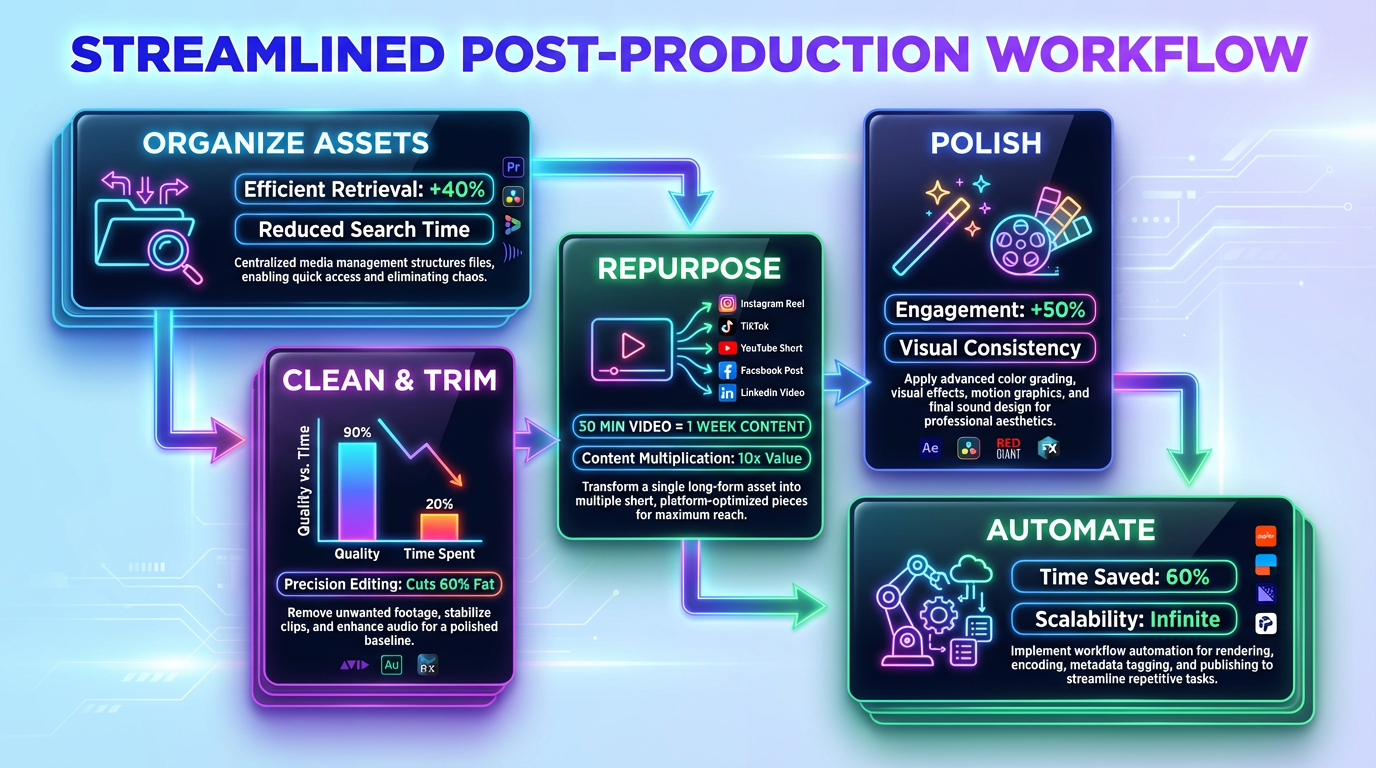
Raw generated assets rarely ship as-is. Editors clean, trim, and polish base clips, audio tracks, and static images into something an audience will watch through to the end in the post-production stage. This stage carries a specific risk. If the handoff from generation is disorganized, editors spend hours reformatting files instead of doing actual work. An organized pipeline exports assets from the generation stage in consistent formats, frame rates, and resolution tiers so that post-production software can ingest them without friction. That structure turns a deliberate post-production process into the fastest segment of the pipeline rather than the slowest.
Different applications handle three layers of work here. The base edit cleans audio and trims footage. The repurposing layer extracts short-form clips from long-form material. The effects layer adds transitions, scene transformations, and cinematic polish. Each layer builds on the one before it, and omitting a layer creates quality problems that compound downstream.
Foundational AI Tools for Post-Production
Descript serves as the primary AI editing tools platform for cleaning raw audio and video. Its interface treats audio like a text document. When a user deletes a word from the transcript, the corresponding audio disappears. Filler word removal, automatic captioning, background noise reduction, and AI-powered reframing for vertical formats handle the repetitive tasks that used to consume hours.
The speed gain is measurable. A Fritz.ai analysis referenced Stanford case study data and found that Descript reduced edit time by 65% for podcasts. Platform users reported 40% more content output after adopting the tool. This throughput increase makes Descript a capable foundation for any business that processes regular content before the team reuses the long-form materials.
Reuse of Long-Form Materials
Once the base edit is clean, Opus Clip extracts the highest-performing segments from long-form video output. The application analyzes a full-length video, identifies moments with the strongest hooks and engagement potential, and generates short-form clips that fit TikTok, Reels, and Shorts.
The sequence matters here. Opus Clip pulls clips that still contain filler words, dead air, and background noise when it processes unedited footage. Opus Clip produces polished clips that need minimal additional work after Descript cleans the base edit. This sequence allows a single 30-minute video to yield a week's worth of short-form content without any manual edits before editors apply advanced visual effects and transitions.
Advanced Visual Effects and Transitions
For projects that need more than clean cuts, Manus AI, Nanobanana Pro, and SeaDance add a layer of cinematic polish. Manus AI reverse-engineers viral visual styles so users can replicate proven aesthetic patterns. Nanobanana Pro transforms static scenes into dynamic and cinematic compositions. SeaDance generates smooth transition shots that connect segments without jarring jumps.
These AI editing tools sit at the end of the post-production chain for a structural reason. Users must rework transitions every time a cut changes if they apply effects before they lock the base edit. This correct sequence locks the Descript edit first, extracts clips with Opus Clip second, and applies effects and transitions last before the asset moves to the localization and distribution stage.
Stage 4 - Localization and Distribution
The final stage of the pipeline turns one finished asset into many. HeyGen handles video translation with lip-sync accuracy that matches mouth movements to the target language. This feature makes a single English-language video distributable across Spanish, Portuguese, German, and Mandarin markets without new filming. InVideo AI generates platform-specific variations, and users on Reddit have rated it 9.4 out of 10 for time savings when they produce 30 days of native content in minutes. The numbers behind this stage explain why businesses that skip it lose potential reach. Companies that use AI video tools for distribution report 68% faster time-to-publish for video campaigns and save 34 hours per week on post-production work. This time savings returns a full work week to strategy and creative development.
The deliberate reuse workflow follows a specific path. A long-form YouTube video feeds into Opus Clip, and the software extracts short-form clips for TikTok, Reels, and Shorts. Those clips then pass through HeyGen for language localization. InVideo AI reformats the remaining material into platform-native posts with adjusted aspect ratios, caption styles, and pacing. This pipeline means one production session populates multiple channels across multiple regions. Businesses that handle fast production cycles at scale rely on this exact sequence to maintain consistency without multiplying effort, and this efficiency directly affects their total production costs.
Real Creator Stack Costs
An understanding of individual subscription costs tells half the story. The total ownership cost reveals what an entire AI tools for content creation pipeline runs per month compared to the human labor it replaces.
A calculated budget breaks into three tiers depending on production volume and content complexity:
-
Starter tier budget ($60–$100/month): InVideo AI ($25), Canva Pro ($15), and ChatGPT Plus ($20) cover scripting, basic visuals, and platform-native video. This combination handles daily social posts for a single brand and replaces standard manual schedule tasks.
-
Mid-tier production ($300–$700/month): The addition of Descript ($24), Opus Clip ($20–$40), and a video generation tool like Kling AI ($66–$200) builds a pipeline capable of long-form video, short-form edits, and polished audio. This tier produces weekly YouTube content alongside daily short-form clips.
-
Full production stack ($1,500–$4,000/month): A pipeline with HeyGen for localization, Runway Gen-4.5 for advanced refinement, Topaz for upscaling, and Google Veo for cinematic hero assets covers research through multilingual distribution.
That top tier deserves context. A Growth Rocket enterprise analysis found that a thorough AI stack replaces two to three full-time positions and runs $1,500–$4,000 monthly versus $250,000–$555,000 for equivalent human capital annually. The strategic advantage provides the ability to scale output without an increase in headcount. The tension between quality and budget sharpens as adoption grows, and the next section explains the reality of adopting these tools without a clear structure.
Adoption Reality Check
Adoption rates tell a complicated story. The majority of companies now use AI editing tools in some capacity, yet a significant portion report no measurable improvement. The gap between AI use and actual benefits comes down to whether the tools sit inside a structured pipeline or float as disconnected subscriptions. A realistic assessment of the landscape reveals a deeper tension. Speed and polish have become easier to achieve, but audiences have grown more sensitive to machine-generated content. The Clutch Brand Authenticity Playbook found that 59% of consumers notice when tone becomes robotic in AI-generated messages, and 19% actively distrust it. That finding puts a ceiling on what automation alone can accomplish.
The companies that report genuine workflow improvements share a common trait. They treat AI as infrastructure and keep human judgment in control of creative decisions. The editing tool cleans the audio. The generation platform renders the footage. The distribution tool reformats for each channel. However, a human decides the narrative arc, the emotional beat, and the brand voice that holds the asset together. This division of labor works until the volume of production outgrows what manual oversight can sustain. This growth shows when the DIY stack breaks.
When DIY Stack Breaks
Every self-managed pipeline has a ceiling, and AI video tools hit it faster than most businesses expect. The first signs appear as structural problems. For example, characters shift appearance between generated frames, an API rate limit interrupts a batch render mid-production, or brand colors drift because no centralized style guide governs the generation prompts. These issues represent systemic failures that multiply with volume rather than occasional glitches. The Clutch Brand Authenticity Playbook reinforces why these breakdowns matter commercially. Their research found that 86% of consumers say human involvement increases authenticity, while 77% believe AI-generated marketing reduces it. When production infrastructure cracks, the output loses the consistency that audiences read as trustworthy.
Manual tool connections work at low volume. A single employee who manages five assets per week can catch inconsistencies, re-export files, and adjust prompts by hand. A company that produces fifty assets per week across four languages cannot. The engineered alternative provides an execution partner that owns the handoffs between stages, maintains prompt libraries for brand consistency, and monitors output quality across the entire chain. Businesses that need to ship content at scale eventually face this choice. They can manually patch the pipeline or hand the infrastructure layer to a partner built for that purpose. The decision depends on content type, and the next section explains these differences in a practical framework.
How XTRND Turns Separate AI Tools Into One Workflow
Most companies start with a collection of strong AI tools. They use ChatGPT for scripts, Kling for visuals, Descript for edits, and HeyGen for localization. That approach works at low volume, but the process becomes difficult to manage as production expands across more formats, channels, and languages.
XTRND solves this problem by acting as the operating system behind the stack. Rather than replacing tools like Kling, Runway, Descript, or HeyGen, XTRND connects them into a single managed workflow with consistent handoffs, brand controls, and multi-channel distribution.
A single source asset can move from research and script development to generated footage, post-production, localization, and final delivery without an internal team stitching the process together manually. This allows brands to scale content output while maintaining speed, quality, and a consistent voice. Companies that outgrow a DIY stack can work with XTRND to connect research, generation, editing, and distribution into a single production system.
Practical Decision Framework
Software selection depends on what the final asset needs to accomplish. A TikTok reel demands a different pipeline than a cinematic brand film, and an identical treatment of both formats wastes budget on tools that fail to serve the format. An organized approach matches the tool stack to the content type from the start.
The following blueprint covers the four most common production scenarios and maps AI tools for content creation and AI editing tools to each:
-
Social media reels: InVideo AI generates platform-native drafts. Opus Clip extracts highlight segments from any existing long-form material. Canva Pro handles thumbnail and overlay graphics. This stack prioritizes speed and volume over cinematic quality.
-
Educational content: Descript anchors the workflow with transcript-based edits, automatic captions, and filler word removal. Canva Pro builds diagrams, slides, and support visuals. ChatGPT Plus drafts lesson outlines and structures module sequences. Clarity and pacing matter more than visual effects here.
-
Cinematic brand videos: Kling AI or Google Veo generates the base footage. Runway Gen-4.5's ALF feature refines motion and composition. Topaz upscales the final render to broadcast-grade resolution. Descript handles audio cleanup. This stack demands the highest per-asset investment but produces the strongest visual output.
-
Global campaigns: The full production stack feeds into HeyGen for lip-synced video translation across target languages. InVideo AI reformats localized assets into platform-specific variations. Opus Clip extracts region-specific highlight clips. One production session populates multiple channels across multiple markets.
Each scenario follows the same underlying sequence of research, generation, edits, and distribution. The tools change, but the pipeline logic stays constant through the final conclusion.
Conclusion
In summary, organizations that ship consistently avoid stalling because they connect their software into a repeatable pipeline. These organizations string their AI tools for content creation together so that research flows into generation, generation flows into editing, and editing flows into distribution. They often start with a basic subscription stack and expand stage by stage. As production demands grow beyond what manual stitching can sustain, they work with execution partners like XTRND to connect pre-production through delivery with engineered handoffs. Evaluating current workflows and linking applications today helps these organizations build a stronger production foundation.